AutoClicker (自動連點器)
A downloadable game for Windows
Auto Clicker
Auto Clicker is a powerful, lightweight, and easy-to-use automation tool designed for gamers and professionals. Whether you need to keep your screen awake, automate Minecraft/Roblox tasks, or perform repetitive data entry, this tool covers your needs. It is more than just a clicker; it is a Macro Recorder that can record your mouse movements and keyboard inputs to achieve complex automation!
🌟 Key Features
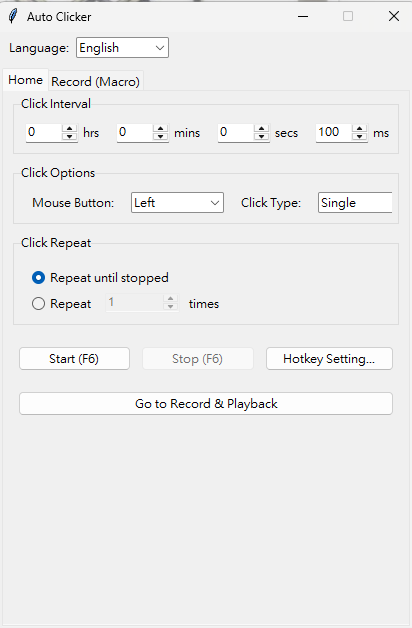
- ⚡ High Precision Clicking: Set click intervals ranging from hours down to milliseconds.
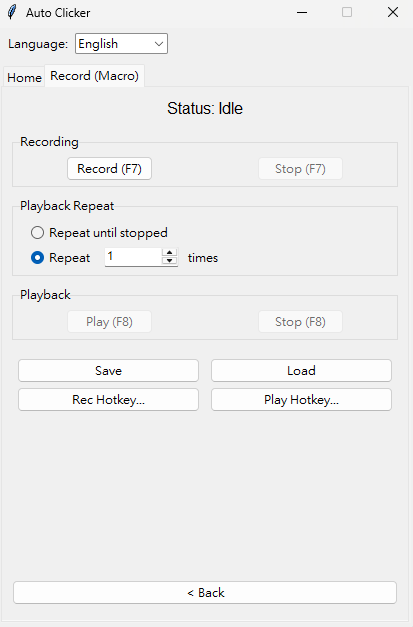
- 🔴 Macro Recorder: Record mouse movements, clicks, and keystrokes to automate complex tasks (e.g., farming in games, repetitive form filling).
- 🖱️ Mouse Settings: Supports Left, Right, and Middle mouse buttons; Single or Double click.
- ⌨️ Customizable Hotkeys:
- F6: Start/Stop Auto Clicker
- F7: Start/Stop Recording
- F8: Play/Stop Macro (All hotkeys can be customized in settings)
- 🌐 Multi-language: Switch instantly between English, Traditional Chinese (繁體中文), and Simplified Chinese (簡體中文).
- 🚀 Portable Version: No installation required. Just download and run.
📖 How to Use
- Auto Click Mode:
- Set your desired interval (e.g., 100ms).
- Select the mouse button (Left/Right).
- Press F6 to start clicking. Press F6 again to stop.
- Macro Recording Mode:
- Switch to the "Recording (Macro)" tab.
- Press F7 to start recording your actions.
- Perform your tasks (mouse movements, clicks, typing).
- Press F7 to stop recording.
- Press F8 to replay your actions perfectly!
⚠️ Antivirus Warning (False Positive Disclaimer)
This application is written in Python. Since it automates mouse and keyboard actions, some antivirus software (e.g., Windows Defender) may flag it as a "False Positive" (Virus).
Please rest assured, this software is 100% safe and harmless. It does not collect any data and does not connect to the internet. If you encounter a warning:
- Click "More Info".
- Select "Run Anyway".
- Or add the file to your antivirus exclusion list.
💬 Support & Feedback
If you like this tool, please consider leaving a comment or donating to support future updates! Software development is hard work. If you find this tool useful, your donations or supportive comments are greatly appreciated!
自動點擊器 (Auto Clicker)
自動點擊器是一款專為遊戲玩家與專業人士設計的自動化工具,功能強大且輕巧易用。無論您需要保持螢幕常亮、自動掛機(如 Minecraft/Roblox),或是處理重複性的資料輸入,這款工具都能滿足您的需求。 它不僅僅是一個點擊器,更內建巨集錄製器 (Macro Recorder),能錄製您的滑鼠移動與鍵盤輸入,實現複雜的自動化操作!
🌟 主要功能
- ⚡ 高精度點擊:可設定點擊間隔,範圍從數小時到毫秒級別皆可。
- 🔴 巨集錄製器:錄製滑鼠移動、點擊和鍵盤敲擊,自動執行複雜任務(例如:遊戲練功刷怪、重複填寫表單)。
- 🖱️ 滑鼠設定:支援滑鼠左鍵、右鍵和中鍵;可選擇單擊或雙擊。
- ⌨️ 自訂快速鍵:
- F6:啟動 / 停止自動點擊
- F7:開始 / 停止錄製
- F8:播放 / 停止巨集 (所有快速鍵均可在設定中自定義)
- 🌐 多語言支援:支援英文、繁體中文和簡體中文即時切換。
- 🚀 免安裝便攜版:無需安裝,下載後即可直接執行。
📖 使用教學
- 自動點擊模式:
- 設定所需的間隔時間(例如:100毫秒)。
- 選擇滑鼠按鍵(左鍵 / 右鍵)。
- 按下 F6 鍵開始點擊。再次按下 F6 鍵即可停止。
- 巨集錄製模式:
- 切換至「錄製 (巨集)」分頁。
- 按下 F7 開始錄製您的操作。
- 執行您的任務(滑鼠移動、點擊、打字)。
- 再次按下 F7 停止錄製。
- 按下 F8 鍵,即可完美重播剛才的操作!
⚠️ 防毒軟體誤報說明
本程式使用 Python 編寫。由於具備自動控制滑鼠與鍵盤的功能,部分防毒軟體(如 Windows Defender)可能會將其誤判為「病毒」或「威脅」。
請放心,本軟體 100% 安全無害。它不會收集任何個人數據,也不會連線至網際網路。若您遇到阻擋警告:
- 點擊「其他資訊」 (More Info)。
- 選擇「仍要執行」 (Run Anyway)。
- 或將本程式加入防毒軟體的排除清單中。
💬 支持與回饋
如果您喜歡這個工具,請考慮留言或贊助以支持未來的更新! 軟體開發不易,如果您覺得好用,歡迎贊助或留言給予鼓勵!
Download
Click download now to get access to the following files: